New here? Sign Up | Log out

TweakNow PowerPack 2010 v2.3.0

TweakNow PowerPack is a fully-integrated suite of utilities that let you fine-tune every aspect of your computer's operating system and Web browser. The Registry Cleaner module provides you with a safe and simple way to clean Windows Registry. To keep your computer always at top performance, we recommend to clean your registry at least once a month. For Windows tweaking lovers, the suite provides more than 100 hidden Windows settings in the Windows Secret section. Using modules included in this section, you can easily customize your Windows like geeks do. The Virtual Desktop module lets you run as many as four custom-designed desktop configurations simultaneously, allowing you to tailor your computer screen to your mood and your work requirements. Last but not least, the suite also gives you a complete picture of all aspects of your computer's hardware, including detailed information about your motherboard, processor, video card, memory, hard disk and network.
New in v2.3.0

* General: Added Secure Delete module
* Other minor improvements and bug fixes

New in v2.2.0

* Track Cleaner: Added support for Memory Dumps
* Track Cleaner: Added support for Chkdsk File Fragments
* Track Cleaner: Added support for Windows Logs
* Track Cleaner: Added support for Windows Error Reporting
* Other minor improvements and bug fixes


Visit website | Download (6.46 Mb)

FreeUndelete 2.0.32775 Restores Deleted Files

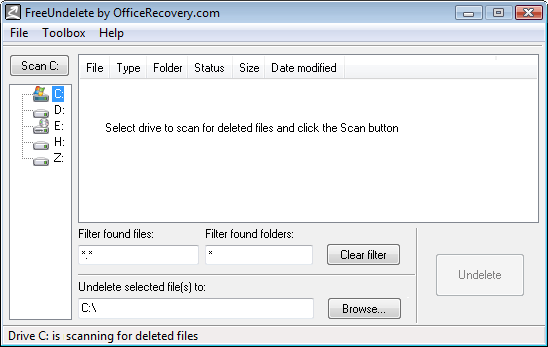
FreeUndelete is a freeware data recovery program for deleted files.

In case of accidental deletion of files on a NTFS (used by default in Windows XP, 2000 and NT), FAT32 or FAT16 file systems, FreeUndelete is the utility to help.

A deleted file is essentially an area on disk designated as free and ready to accept data (such as contents of some other file). Luckily, unless the area has already been overwritten, it still holds the contents of the deleted file. Due to this fact it is possible to undelete files.

This fact also dictates the following procedure for using FreeUndelete:

1. Stop any activity on the disk you are going to undelete files from! Remember that writing to that disk can damage the contents of the deleted files. Examples of disastrous activity include: copying files to the disk, installing programs there or running programs that use the disk as their swap media.
2. Download and install FreeUndelete. Whenever possible, save the setup executable and install the program to a disk that does not hold files you need to undelete.
3. Run and use FreeUndelete.


Visit website
| Download (720 Kb)

Comodo Dragon 1.0.0.10 - Fast and Secure Internet Browser

Comodo Dragon, A Chromium technology-based Browser that offers you all of Chrome's features PLUS the unparalleled level of security and privacy you only get from Comodo. Including a greater level of privacy than Chromium technology offers.

The Comodo companies are innovative and prolific developers of online security and trust assurance solutions. The Comodo Dragon has taken the latest Chromium technology and beefed it up in the one way necessary to make it the optimum Browser to use on today's malware plagued Internet. – Superior Security and Privacy. Comodo Dragon not only gives you the complete compliment of features offered by Chromium (key features listed above), it also gives you Comodo's unsurpassed security and privacy features.
Comodo Dragon Security:

* Has privacy enhancements that surpass those in Chromium's technology
* Has Domain Validation technology that identifies and segregates superior SSL certificates from inferior ones
* Stops cookies and other Web spies
* Prevents all Browser download tracking to ensure your privacy


Visit website | Download (20.9 Mb)

BleachBit 0.7.3 Quickly Clean the System

BleachBit quickly frees disk space, removes hidden junk, and easily guards your privacy. Erase cache, delete cookies, clear Internet history, remove unused localizations, shred logs, and delete temporary files. Designed for Linux and Windows systems, it wipes clean 70 applications including Firefox, Internet Explorer, Flash, Google Chrome, Opera, Safari, Adobe Reader, APT, and more.

Beyond simply deleting files, BleachBit includes advanced features such as shredding files to prevent recovery, wiping free disk space to hide traces of files deleted by other applications, and vacuuming Firefox to make it faster.


Visit website | Download (6.38 Mb)

Driving Speed 2 v2.0 Free Full Game

Driving Speed 2 is a free high quality racing game for your PC. Choose from four high powered V8 muscle cars and race against up to 11 computer controlled opponents on two touring car circuits.

This game has realistic graphics, realistic car physics and performance, high quality sound and AI. Play against your friends over a LAN or internet with 8 player Multiplayer.

Send your fastest lap records to the online lap records where you can see your times against players from all around the world.

System Requirements:

* Windows 2000 / XP / Vista / Windows 7
* 1GHz CPU or higher
* 256MB RAM
* 228MB Hard Drive Space
* Graphics Card with Pixel Shader Support
* DirectX 9 Drivers

What´s New in version 2.0.7:

* Optimized frate rate.
* Fixed a minor glitch in the online leaderboard results.


Visit website | Download (122.12 Mb)

McAfee AVERT Stinger 10.0.1.934

McAfee AVERT Stinger is a stand-alone utility used to detect and remove specific viruses. It is not a substitute for full anti-virus protection, but rather a tool to assist administrators and users when dealing with an infected system. Stinger utilizes next generation scan engine technology, including process scanning, digitally signed DAT files, and scan performance optimizations.

Windows ME/XP/Vista users:

Disabling System Restore
Windows utilizes a restore utility that backs up selected files automatically to the C:_Restore folder. This means that an infected file could be stored there as a backup file, and VirusScan will be unable to delete these files. You must disable the System Restore Utility to remove the infected files from the C:_Restore folder.

For detailed help, read this.


Visit website | Download (7.87 Mb)

Pegasus Mail 4.52

Pegasus Mail is a free, standards-based electronic mail client suitable for use by single or multiple users on single computers or on local area networks. It has special support for Novell NetWare LANs that allow it to operate intuitively and with almost no maintenance.

Pegasus Mail gives you multiple viewing options; automated rule-based filtering and content control; MailMerge and distribution list functions; support for SMTP, POP3, IMAP4, LDAP, and PH protocols; comprehensive HTML mail generation; address books with aliasing functions; and even a spelling checker.


Visit website | Download (9.5 Mb)

Nexus Radio 5.0 - Nice Working 5.1 Surround Sound

Nexus Radio is a free all-in-one application for all of your music needs. Search and download over 15 million songs directly to your PC, or listen to and record over 11,000+ radio stations free of charge! You can play downloaded songs directly within Nexus Radio, or transfer songs to your iPod/iPhone or any other multimedia device effortlessly. In addition to a library of rich music content, Nexus Radio is also loaded with additional free easy to use music tools. Create custom ringtones using the built in music trimmer, or use the Nexus Radio ID3 tag editor to easily tag your music files. Users can also create a custom profile and take advantage of the other many free services we offer. You can upload photos, create personal blogs, establish groups, and post events all for free. Version 5 improves compatibility with Windows Vista and Windows 7.

Features

» No monthly fees.
» No spyware, malware, or adware.
» Over 15 million songs.
» On-demand music search.
» 11,000+ radio stations.
» 38 music genres.
» Full featured media player.
» Straightforward audio editor.
» One click recording.
» Easy to use TiVo style recording.
» Recording filters.
» 10-band equalizer.
» HD audio.
» iPod & iPhone compatible.
» File support: AAC, MP4, MP3, MP2, MP1, OGG, WAV & WMA.
» Dynamic stream recorder with auto file naming features.
» Automatic ID3 v1/v2 tag support.
» ID3 v1/v2 tag editor.
» 32 Bit Digital effects.
» 5.1 Surround sound.
» Downloadable visualizations.
» Plugin support.

Nexus Radio System Requirements

» Intel® Pentium® or Xeon® processor /AMD® processor
» Microsoft® Windows® Vista/XP/2000/2003
» Microsoft® Internet Explorer®
» 128MB of RAM (256MB recommended)
» 12MB of available hard-disk space
» Color monitor with 32-bit color video card
» Sound Card
» Internet connection required

Nexus Radio has been designed to be fully compatible with Windows® 7/Vista/XP/2000/2003 machines. This product is not compatible with any other Windows® operating systems. Nexus Radio does not contain spyware, malware, or adware.


Visit website | Download (10.1 Mb)

GMail Drive Shell Extension 1.0.16

GMail Drive is a Shell Namespace Extension that creates a virtual filesystem around your Google Mail account, allowing you to use Gmail as a storage medium.

GMail Drive creates a virtual filesystem on top of your Google Gmail account and enables you to save and retrieve files stored on your Gmail account directly from inside Windows Explorer. GMail Drive literally adds a new drive to your computer under the My Computer folder, where you can create new folders, copy and drag'n'drop files to.

Ever since Google started to offer users a Gmail e-mail account, which includes storage space of 6000 megabytes, you have had plenty of storage space but not a lot to fill it up with. With GMail Drive you can easily copy files to your Google Mail Account and retrieve them again.
When you create a new file using GMail Drive, it generates an e-mail and posts it to your account. The e-mail appears in your normal Inbox folder, and the file is attached as an e-mail attachment. GMail Drive periodically checks your mail account (using the Gmail search function) to see if new files have arrived and to rebuild the directory structures. But basically GMail Drive acts as any other hard-drive installed on your computer.
You can copy files to and from the GMail Drive folder simply by using drag'n'drop like you're used to with the normal Explorer folders.

Because the Gmail files will clutter up your Inbox folder, you may wish to create a filter in Gmail to automatically move the files (prefixed with the GMAILFS letters in the subject) to your archived mail folder.

Please note that GMail Drive is still an experimental tool. There's still a number of limitations of the file-system (such as total filename size must be less than 65 characters). Since the tool hooks up with the free Gmail Service provided by Google, changes in the Gmail system may break the tool's ability to function. I cannot guarantee that files stored in this manner will be accessible in the future.


Visit website | Download (371 Kb)

Notepad++ 5.7 RC

Notepad++ is a free source editor and Notepad replacement with the syntax highlighting.

It also gives the extra functionality to the general user: colorize the user defined words. You can print your source code in color (or whatever you want) if you have a color printer (WYSIWYG). Furthermore, Notepad++ includes the multi-view feature, which allows the user to edit the different documents at the same time, and even edit the same document synchronously in 2 different views.
Notepad++ supports drag and drop: not only you can drop the file from explorer to open it, but also you can drag and drop a document from a view to another. With all the functionalities, Notepad++ runs as fast as Notepad provided by MS Windows.

Features:

* Syntax Highlighting and Syntax Folding
* User Language Defined System
* Tabed document and Multi-View
* More than 50 languages supported
* Full Drag ‘N' Drop supported
* Macro recording and playback
* Extensible with its plugin system

Download the Stable version: Notepad++ 5.6.8

What's New in version 5.7 RC:

* Upgrade Scintilla to version 2.12.
* Add "Inverse bookmark" feature.
* Add NPPM_SAVECURRENTFILEAS message.
* Fix premature deallocation bug for import UDL.
* Add import/export User Defined Language features.
* File detection : Switch to modified or deleted file while user is asked to reload or keep the file.
* Fix closing several detected non-existing files bug.
* Fix language switching to English not working bug.
* Reduce PostIt/FullScreen restore button size.
* Fix PostIt wrong restore button position after toggling off fullScreen mode.


Visit website | Download (3.21 Mb)

avast! Free Antivirus 5.0.594

avast! Free Antivirus is a free complete ICSA certified antivirus software for home noncommercial use. avast! obtained VB100% awards in 2002/4 Virus Bulletin comparative reviews under Windows.

avast! Free Antivirus includes the following components:

* On Demand Scanner - with Skinnable Simple Interface - just select what do you want to scan in which way and press the Play button.
* On Access Scanner - resident scanning of all files being opened, read and written and behavior blocker monitoring dangerous actions of viruses.
* E-mail scanner easily integrates with most mail clients and it checks both incoming and outgoing mails, it provides heuristic analysis of mail content to protect against new Worms.
* Network Shield - scans traffic for malicious content - lightweight Firewall.
* Resident protection for IM programs (e.g. MSN Messenger, ICQ) and P2P programs (e.g. Kazaa, DirectConnect).
* Boot Time Scanner - scans disks in the same way and in the same time as Windows CHKDSK does (on NT/2000/XP only).
* Explorer Scanner - right click on the object allows you to scan it.
* Screen Saver Scanner - scans PC during your coffee breaks.
* Virus Chest - safety isolated folder to store infected, suspicious and even some system files - to restore them.

True incremental updates of size under 100 KB are available at least twice a week and within couple of hours in the case of emergency of new virus. avast! automatically checks for new updates - downloads, installs and loads them without restart or logoff. Program upgrades are available time to time, they are incremental too (about 300 KB).

avast! Free Antivirus is available in English, French, German, Italian, Japaneese, Polish, Portuguese, Russian, Spanish and other languages - check http://www.avast.com/eng/down_home.html to download avast! in your language.

Note:FREE registration is required after 30 days. A FREE license key is easily obtained from the convenient registration form within the program interface.


Visit website | Download (46.19 Mb)

Winamp Full 5.58

Nullsoft Winamp is a fast, flexible, high-fidelity music player for Windows. Winamp supports MP3, CD, WMA, Audiosoft, Mjuice, MOD, WAV and other audio formats, custom appearances called skins and audio visualization and audio effect plug-ins. Download and enjoy it free of charge, free of guilt.

Features:

* Basic controls: play, pause, stop, forward song, previous song, select new song
* Built-in spectrum analyzer and oscilloscope
* Track info: author, title, bitrate, sample rate, time, etc.
* Additional controls: position slider, balance, volume, equalizer, playlist, shuffle and repeat
* Can run in unobtrusive windowshade mode.
* All windows dock seamlessly.
* Drag and drop playlist editing
* Create and save new playlists or load a previous playlist.
* Edit song information via ID3 tag editor.
* Sort by title and filename or randomize.
* Playlist displays current song duration and complete playlist duration for easy dubbing.
* Playlist can run without the main window, and includes mini-controls, time display, and visualization.
* Ten band graphic equalizer and built-in pre-amplifier
* Create and save new pre-amplifier and equalizer settings or load previous setttings.
* Create and save song-specific pre-amplifier and equalizer settings.
* Get up to the minute in information on Winamp.
* Browse Winamp´s Plugin and Skin collection to customize your copy of Winamp.
* Support for .wsz files in your skin directory as well as .zip files
* Bookmark playlists and SHOUTcast streams

The Lite version Plays MP3s, AAC, WMA, and more; Compatible with Winamp Plug-ins; and has Full Support for Classic Skins.

New Features:

* A Completely Redesigned Interface, including Album Art
* Multiple device support, including iPods
* Access and Share Your Music and Videos with Winamp Remote
* Play and Playlist the Best Music on the Web with Media Monitor
* Get Artist & Concert News, Videos & more with Smart Search
* Enjoy Dynamic Song Recommendations
* Experience MP3 Surround Sound Support
* Access to Thousands of Internet Radio Stations, Videos and More!
* 50 FREE MP3 Music Downloads compliments of eMusic's 2-week Trial
* Auto-Tagger provides automatic updates to file information
* Control Winamp From Your Browser with the Winamp Toolbar

What's New in version 5.58:

* New: 7digital mp3 store in Online Services
* New: WebM Video support for in_mkv & vp8 decoder for in_nsv
* New: [ml_downloads] Improved download manager for Podcasts and Online Services
* New: [pmp_android] Android device support
* Improved: New 256x256 icons for Win7/Vista (with filetypes support via gen_jumpex)
* Improved: New Previous/Play/Pause/Stop/Next toolbar buttons for Win7 taskbar
* Improved: New 'Vertically flip videos' option for compatibility with old drivers
* Improved: Video OSD positioning & design improvements
* Fixed: External language folder always looking in a 'en-US' folder
* Fixed: Handling of global keyboard accelerator table (fixes: Ctrl+Alt+N, Ctrl+T, etc)
* Fixed: Scrolling issues with high resolution mice
* Fixed: Stackoverflow issue when loading a malformed whatsnew.txt
* Fixed: [enc_flac] Compression Factor config setting (always outputting at level 5)
* Fixed: [vis_milk2] Some presets not loading under locales other than English
* Misc: Added more genres to File Info dialog
* Misc: More general tweaks, improvements, fixes and optimizations
* Updated: [gen_jumpex] JTFE v1.1
* Updated: [in_vorbis] libogg 1.2.0 & libvorbis 1.3.1
* Updated: [lame_enc] LAME 3.98.4
* Read the full Changelog


Visit website | Download (14.5 Mb)

Links